
GhostPilot documentation — League of Legends script
Guide
Step-by-step installation
The script is injected through the BIOS from a USB stick — that is why it goes undetected. Follow the guide and do not skip any step.
Video tutorial included
Once your purchase completes we send you the full installation video by Telegram or email, together with your key. You will see the whole process recorded step by step, and if anything gets stuck we will do it with you.
Get your key
Pick a duration (1, 7 or 30 days) and pay in crypto. You receive the key on Telegram or email, whichever you choose at checkout.
Prepare the USB
Format a USB stick and load the loader onto it. The script injects from the BIOS and never touches your Windows install.
Adjust the BIOS
Disable Virtualization (VT-x / AMD-V) and Secure Boot. Save and reboot from the USB stick.
Run the loader
Enter your key and wait a few seconds for the script to initialise.
Open LoL and activate
Join a game and press your activation key: the in-game menu appears. Pick your champion and play.
Stuck on a step? Message us on Telegram and we will do it with you — installation support is included.
Features
Everything the script does
Full automation at professional player level. No visuals, no noise — just performance.
Undetected (Vanguard bypass)
BIOS injection over USB. Gets past Riot's anti-cheat without touching your Windows install.
Auto-evade with prediction
Dodges skillshots on its own, anticipating enemy movement. Works even in fog of war.
Smooth orbwalker
Auto-attacks with fluid kiting and animation cancelling. Indistinguishable from a skilled player.
Smart Target Selector
Picks who to hit by priority, health and distance. Ignores shields and invulnerability.
Per-champion logic
Combos and rotations specific to each champion, not a generic pattern. Full roster supported.
Clean screen
No overlays or drawings over the game. Uses items and summoner spells by itself.
Technical specifications
Core
- Evade
- Prediction
- Orbwalker
- Target Selector
- Per-champion logic
Compatibility
- Windows 10 — all versions
- Windows 11 — all, incl. the latest
- AMD and Intel CPUs
- Internal build (maximum performance)
Champions and activator
- Full champion support
- Automatic initialisation
- Activator included
- Configurable delay
Security
- Vanguard bypass
- BIOS injection over USB
- Never installed into Windows
- Clean screen, no overlays
The panel
What the loader includes
Full in-game menu, configurable down to the detail. Every module adjustable and saveable.
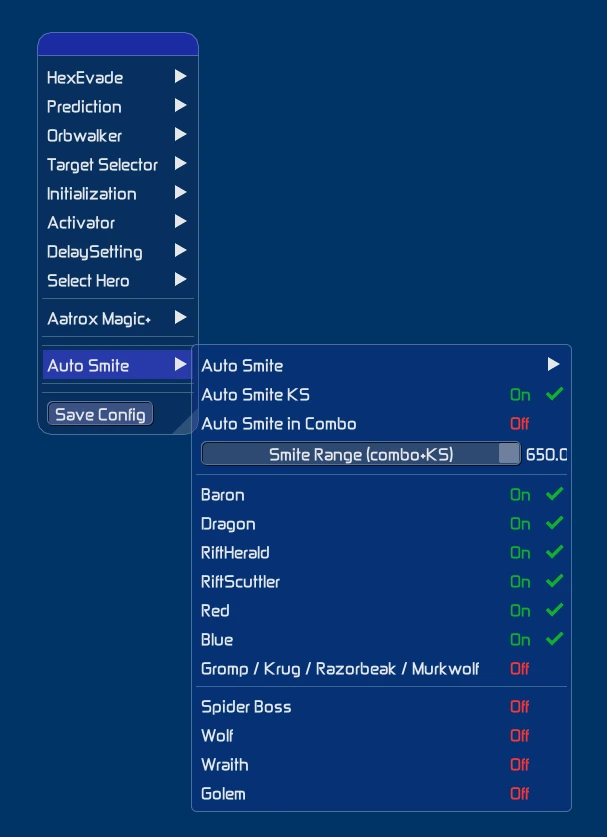
Main menu
Every module + Auto Smite (Baron, Dragon, Herald, buffs).
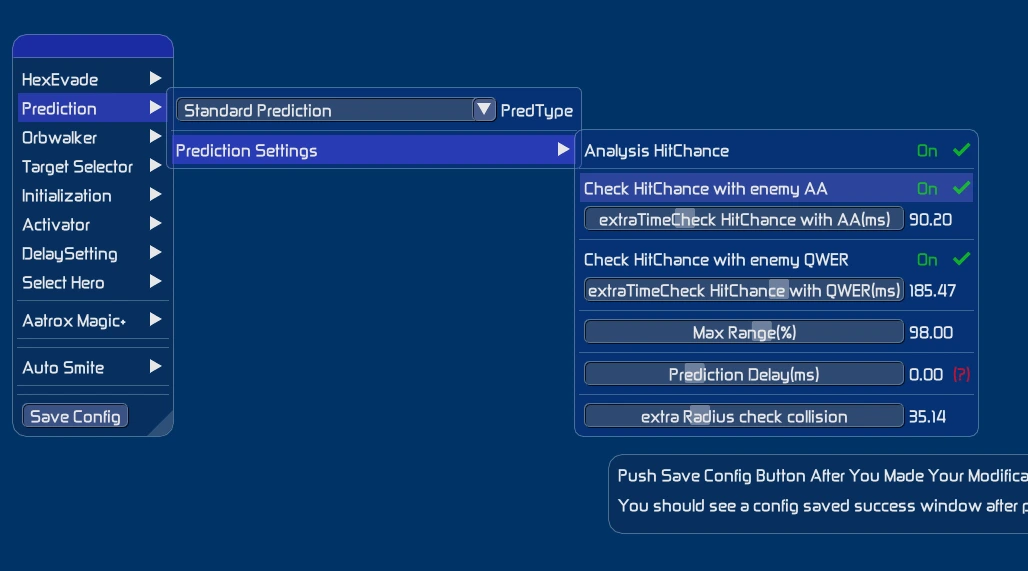
Prediction
HitChance per ability, maximum range and collision.
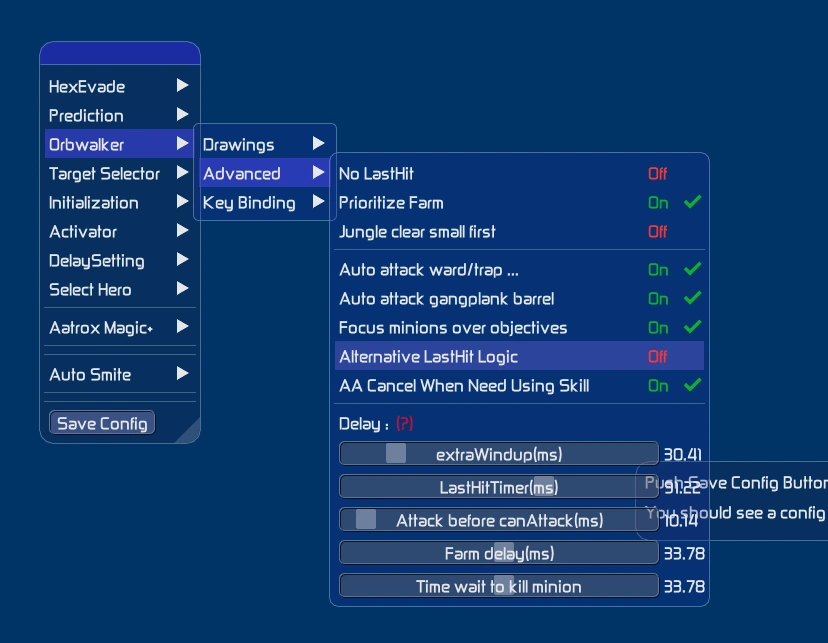
Orbwalker
Last-hitting, farming and AA cancelling with delays.
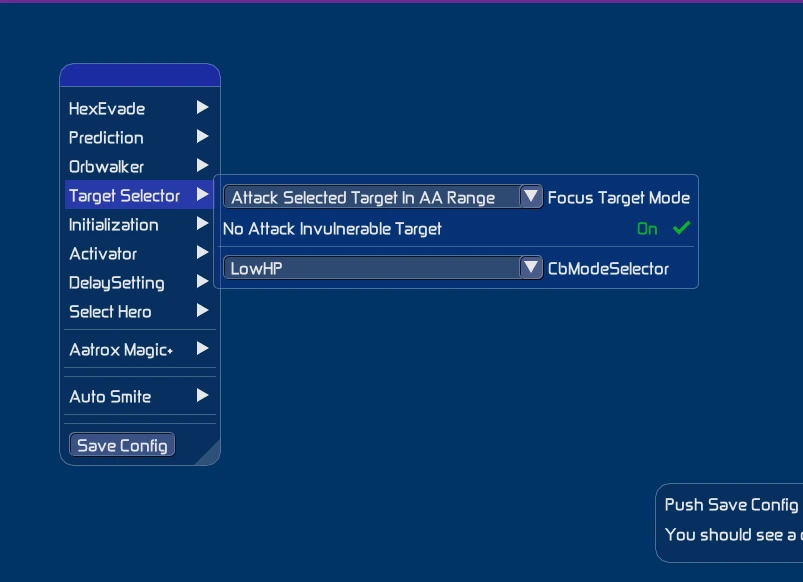
Target Selector
Prioritises by health, ignores invulnerable targets.
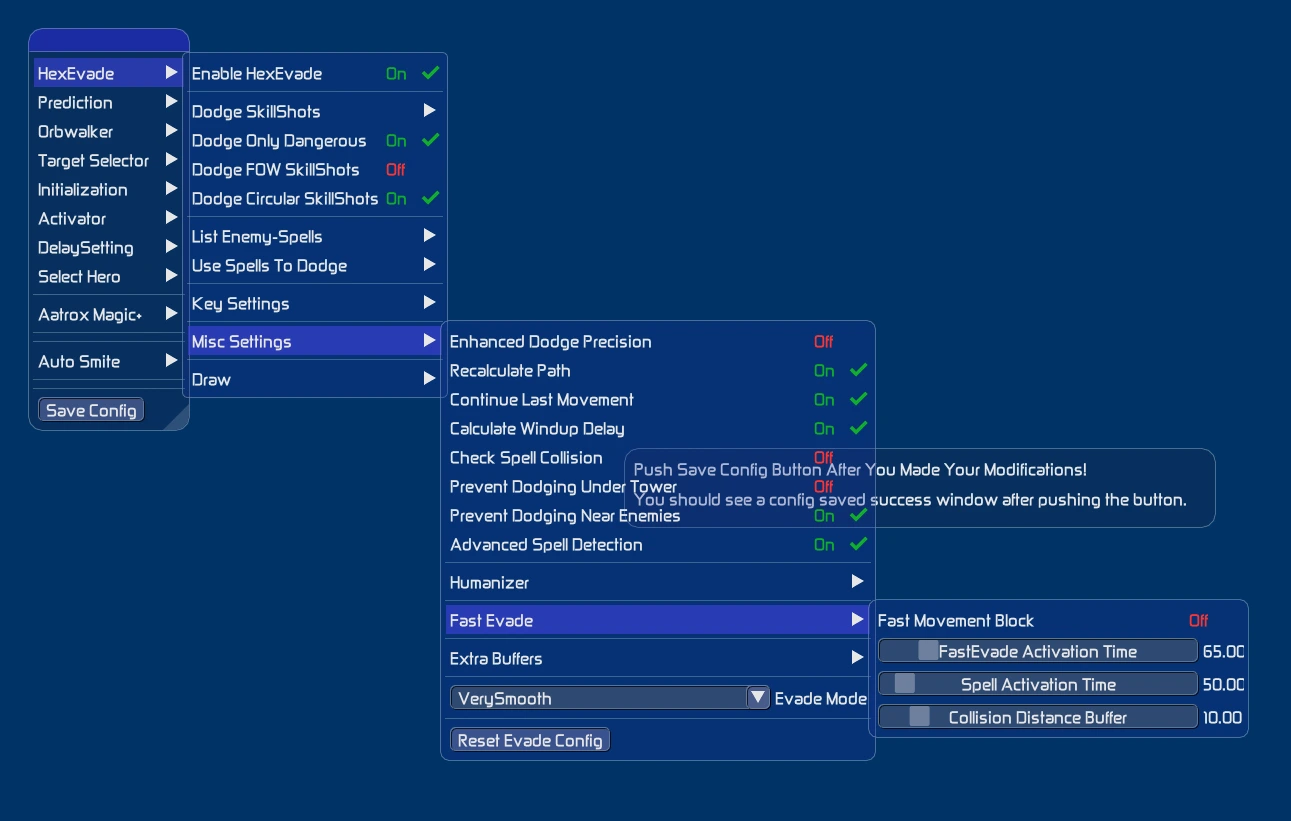
Evade · Settings
VerySmooth mode, Fast Evade and advanced detection.
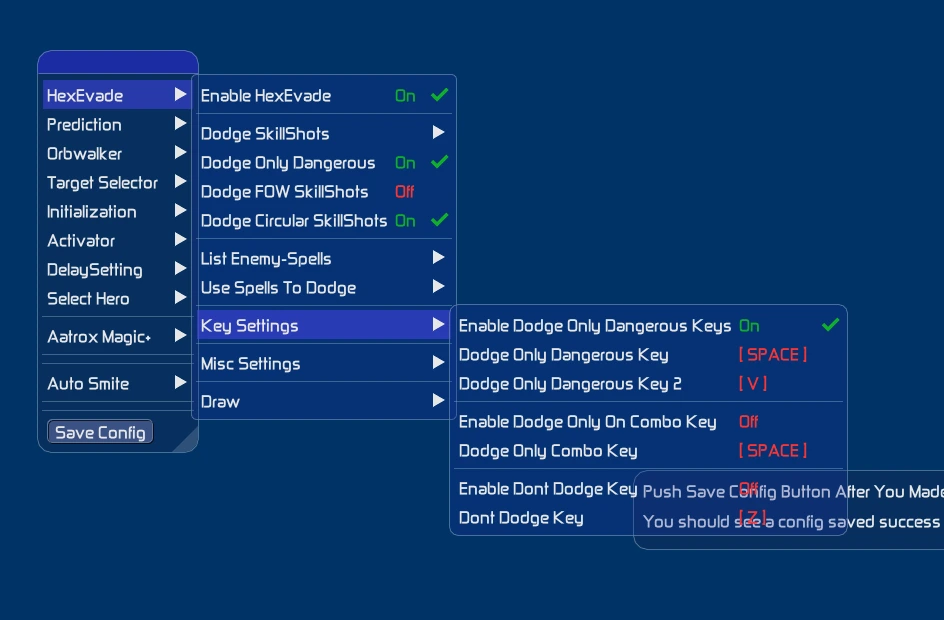
Evade · Keys
Set your dodge keys and combo mode.
Security
How it stays undetected
What the script actually does to get past Riot's anti-cheat — and what it does not do.
Vanguard bypass
The anti-cheat does not detect the script running. The team updates it within 24 h of every patch.
BIOS injection over USB
The script runs below the system, without injecting into the game's memory and without installing anything into your Windows.
Clean screen
No overlays or drawings on top of the game, so nothing shows up in a recording or a stream.
It does not include an HWID spoofer. The bypass keeps the script from being detected; it is not a tool for getting around an existing hardware ban. If that is what you are after, message us before you buy.
Payment methods
Pay in Bitcoin
No banks, no cards and no accounts to register. Choose the network at checkout and your key is released as soon as the transaction confirms.
Bitcoin (on-chain)
The classic payment, works with any wallet or exchange. This is how you pay today: we send you a fresh address per order and your key is released as soon as the transaction confirms.
Lightning Network
Instant confirmation and fees of a few cents. Not enabled yet — we are setting up the node. Pay on-chain in the meantime, or message us on Telegram if you can only pay over Lightning.
How payment works
- 01 You pick a product and tell us where to deliver it: Telegram or email.
- 02 We generate an invoice with the exact BTC amount at the current rate.
- 03 You pay from your wallet. The page updates itself once it confirms.
- 04 You receive your key and the installation video on the channel you chose.
Got another coin and would rather not convert? Message us on Telegram: we will close the sale by hand and tell you how to pay.
FAQ
Frequently asked questions
Is it undetected? Does it get past Vanguard?
Yes. The script is injected from the BIOS via a USB stick, so it never touches your Windows install and gets past Riot's Vanguard anti-cheat. It does not include an HWID spoofer: it stops the script being detected, it does not undo a hardware ban you already have.
What do I need to use it?
Windows 10 or 11 (any version), an AMD or Intel processor and a USB stick. You will need to disable Virtualization and Secure Boot in the BIOS; we give you the guide and step-by-step support.
How much does it cost and what durations are there?
Three keys: 1 day for €14.99, 7 days for €49.99 and 30 days for €99.99. All include the bypass and every feature — only the duration changes.
Which champions does it work with?
All of them. The script includes per-champion logic: evade with prediction, orbwalker, target selector and automatic use of items and summoner spells.
How do I pay and when do I get the key?
Payment is 100% in Bitcoin, on-chain or over Lightning. At checkout you give us your Telegram or your email — one is enough — and as soon as the transaction confirms you receive the key there.
Is there a refund?
Yes, under our refund policy. If you hit any problem during installation, our support helps you on Telegram first.
Updates
Update history
Every LoL patch, matched within 24 hours. This is the real record.
45
supported patches
< 24 h
to update after each patch
0
detections on record
- v26.14CurrentUpdated · 10 Jul 2026
- CompatFull compatibility with patch 26.14.
- EvadeEvade: dodge prediction recalculated for this patch's reworked abilities.
- PredictionPrediction: HitChance recalibrated after the projectile speed changes.
- ChampionChampion logic: combos affected by this patch updated.
- SecuritySecurity: bypass updated for the new Vanguard build.
- v26.13Updated · 26 Jun 2026
- CompatFull compatibility with patch 26.13.
- EvadeEvade: improved skillshot detection in fog of war.
- OrbwalkerOrbwalker: improved last-hitting under tower.
- FixFix: menu misalignment on ultrawide resolutions fixed.
- PerformancePerformance: lower memory footprint for the injector.
- v26.12Updated · 12 Jun 2026
- CompatFull compatibility with patch 26.12.
- EvadeEvade: dodge input delay cut by ~8 ms for cleaner responses.
- TargetTarget Selector: LowHP mode tuned for extended fights.
- SecuritySecurity: loader signature refreshed (BIOS/USB injection).
- v26.11Updated · 29 May 2026
- CompatFull compatibility with patch 26.11.
- EvadeEvade: collision buffer adjusted for the new projectiles.
- PredictionPrediction: new profiles for this patch's ability reworks.
- ChampionChampion logic: combos affected by this patch updated.
- FixFix: general stability and minor corrections.
- v26.10Updated · 15 May 2026
- CompatFull compatibility with patch 26.10.
- EvadeEvade: support for this patch's modified hitboxes.
- OrbwalkerOrbwalker: auto-attack timing fixed after the attack speed changes.
- SecuritySecurity: bypass updated for the new Vanguard build.
- v26.09Updated · 1 May 2026
- CompatFull compatibility with patch 26.09.
- EvadeEvade: VerySmooth mode optimised for less stutter while dodging.
- TargetTarget Selector: LowHP mode tuned for extended fights.
- FixFix: menu misalignment on ultrawide resolutions fixed.
- PerformancePerformance: faster loader startup.
- v26.08Updated · 17 Apr 2026
- CompatFull compatibility with patch 26.08.
- EvadeEvade: dodge prediction recalculated for this patch's reworked abilities.
- PredictionPrediction: extra collision radius adjusted on area abilities.
- ChampionChampion logic: combos affected by this patch updated.
- SecuritySecurity: loader signature refreshed (BIOS/USB injection).
- v26.07Updated · 3 Apr 2026
- CompatFull compatibility with patch 26.07.
- EvadeEvade: improved skillshot detection in fog of war.
- OrbwalkerOrbwalker: kiting adjusted for the new items.
- FixFix: general stability and minor corrections.
- v26.06Updated · 20 Mar 2026
- CompatFull compatibility with patch 26.06.
- EvadeEvade: dodge input delay cut by ~8 ms for cleaner responses.
- TargetTarget Selector: LowHP mode tuned for extended fights.
- SecuritySecurity: bypass updated for the new Vanguard build.
- v26.05Updated · 6 Mar 2026
- CompatFull compatibility with patch 26.05.
- EvadeEvade: collision buffer adjusted for the new projectiles.
- PredictionPrediction: better accuracy against dashes and blinks.
- ChampionChampion logic: combos affected by this patch updated.
- FixFix: menu misalignment on ultrawide resolutions fixed.
- PerformancePerformance: reduced CPU usage in teamfights.
- v26.04Updated · 20 Feb 2026
- CompatFull compatibility with patch 26.04.
- EvadeEvade: support for this patch's modified hitboxes.
- OrbwalkerOrbwalker: animation cancelling (AA cancel) optimised.
- SecuritySecurity: loader signature refreshed (BIOS/USB injection).
- v26.03Updated · 6 Feb 2026
- CompatFull compatibility with patch 26.03.
- EvadeEvade: VerySmooth mode optimised for less stutter while dodging.
- TargetTarget Selector: LowHP mode tuned for extended fights.
- FixFix: general stability and minor corrections.
- v26.02Updated · 23 Jan 2026
- CompatFull compatibility with patch 26.02.
- EvadeEvade: dodge prediction recalculated for this patch's reworked abilities.
- PredictionPrediction: HitChance recalibrated after the projectile speed changes.
- ChampionChampion logic: combos affected by this patch updated.
- SecuritySecurity: bypass updated for the new Vanguard build.
- v26.01Updated · 9 Jan 2026
- CompatFull compatibility with patch 26.01.
- New2026 «For Demacia» season: Orbwalker and Evade rewritten for the new WASD movement and the role mission system.
- EvadeEvade: improved skillshot detection in fog of war.
- OrbwalkerOrbwalker: improved last-hitting under tower.
- FixFix: menu misalignment on ultrawide resolutions fixed.
- PerformancePerformance: lower memory footprint for the injector.
- v25.24Updated · 11 Dec 2025
- CompatFull compatibility with patch 25.24.
- EvadeEvade: dodge input delay cut by ~8 ms for cleaner responses.
- TargetTarget Selector: LowHP mode tuned for extended fights.
- SecuritySecurity: loader signature refreshed (BIOS/USB injection).
- v25.23Updated · 20 Nov 2025
- CompatFull compatibility with patch 25.23.
- EvadeEvade: collision buffer adjusted for the new projectiles.
- PredictionPrediction: new profiles for this patch's ability reworks.
- ChampionChampion logic: combos affected by this patch updated.
- FixFix: general stability and minor corrections.
- v25.22Updated · 6 Nov 2025
- CompatFull compatibility with patch 25.22.
- EvadeEvade: support for this patch's modified hitboxes.
- OrbwalkerOrbwalker: auto-attack timing fixed after the attack speed changes.
- SecuritySecurity: bypass updated for the new Vanguard build.
- v25.21Updated · 23 Oct 2025
- CompatFull compatibility with patch 25.21.
- EvadeEvade: VerySmooth mode optimised for less stutter while dodging.
- TargetTarget Selector: LowHP mode tuned for extended fights.
- FixFix: menu misalignment on ultrawide resolutions fixed.
- PerformancePerformance: faster loader startup.
- v25.20Updated · 9 Oct 2025
- CompatFull compatibility with patch 25.20.
- EvadeEvade: dodge prediction recalculated for this patch's reworked abilities.
- PredictionPrediction: extra collision radius adjusted on area abilities.
- ChampionChampion logic: combos affected by this patch updated.
- SecuritySecurity: loader signature refreshed (BIOS/USB injection).
- v25.19Updated · 25 Sep 2025
- CompatFull compatibility with patch 25.19.
- EvadeEvade: improved skillshot detection in fog of war.
- OrbwalkerOrbwalker: kiting adjusted for the new items.
- FixFix: general stability and minor corrections.
- v25.18Updated · 11 Sep 2025
- CompatFull compatibility with patch 25.18.
- EvadeEvade: dodge input delay cut by ~8 ms for cleaner responses.
- TargetTarget Selector: LowHP mode tuned for extended fights.
- SecuritySecurity: bypass updated for the new Vanguard build.
- v25.17Updated · 28 Aug 2025
- CompatFull compatibility with patch 25.17.
- EvadeEvade: collision buffer adjusted for the new projectiles.
- PredictionPrediction: better accuracy against dashes and blinks.
- ChampionChampion logic: combos affected by this patch updated.
- FixFix: menu misalignment on ultrawide resolutions fixed.
- PerformancePerformance: reduced CPU usage in teamfights.
- v25.16Updated · 14 Aug 2025
- CompatFull compatibility with patch 25.16.
- EvadeEvade: support for this patch's modified hitboxes.
- OrbwalkerOrbwalker: animation cancelling (AA cancel) optimised.
- SecuritySecurity: loader signature refreshed (BIOS/USB injection).
- v25.15Updated · 31 Jul 2025
- CompatFull compatibility with patch 25.15.
- EvadeEvade: VerySmooth mode optimised for less stutter while dodging.
- TargetTarget Selector: LowHP mode tuned for extended fights.
- FixFix: general stability and minor corrections.
- v25.14Updated · 17 Jul 2025
- CompatFull compatibility with patch 25.14.
- EvadeEvade: dodge prediction recalculated for this patch's reworked abilities.
- PredictionPrediction: HitChance recalibrated after the projectile speed changes.
- ChampionChampion logic: combos affected by this patch updated.
- SecuritySecurity: bypass updated for the new Vanguard build.
- v25.13Updated · 26 Jun 2025
- CompatFull compatibility with patch 25.13.
- EvadeEvade: improved skillshot detection in fog of war.
- OrbwalkerOrbwalker: improved last-hitting under tower.
- FixFix: menu misalignment on ultrawide resolutions fixed.
- PerformancePerformance: lower memory footprint for the injector.
- v25.12Updated · 12 Jun 2025
- CompatFull compatibility with patch 25.12.
- EvadeEvade: dodge input delay cut by ~8 ms for cleaner responses.
- TargetTarget Selector: LowHP mode tuned for extended fights.
- SecuritySecurity: loader signature refreshed (BIOS/USB injection).
- v25.11Updated · 29 May 2025
- CompatFull compatibility with patch 25.11.
- EvadeEvade: collision buffer adjusted for the new projectiles.
- PredictionPrediction: new profiles for this patch's ability reworks.
- ChampionChampion logic: combos affected by this patch updated.
- FixFix: general stability and minor corrections.
- v25.10Updated · 15 May 2025
- CompatFull compatibility with patch 25.10.
- EvadeEvade: support for this patch's modified hitboxes.
- OrbwalkerOrbwalker: auto-attack timing fixed after the attack speed changes.
- SecuritySecurity: bypass updated for the new Vanguard build.
- v25.09Updated · 1 May 2025
- CompatFull compatibility with patch 25.09.
- EvadeEvade: VerySmooth mode optimised for less stutter while dodging.
- TargetTarget Selector: LowHP mode tuned for extended fights.
- FixFix: menu misalignment on ultrawide resolutions fixed.
- PerformancePerformance: faster loader startup.
- v25.08Updated · 17 Apr 2025
- CompatFull compatibility with patch 25.08.
- EvadeEvade: dodge prediction recalculated for this patch's reworked abilities.
- PredictionPrediction: extra collision radius adjusted on area abilities.
- ChampionChampion logic: combos affected by this patch updated.
- SecuritySecurity: loader signature refreshed (BIOS/USB injection).
- v25.07Updated · 3 Apr 2025
- CompatFull compatibility with patch 25.07.
- EvadeEvade: improved skillshot detection in fog of war.
- OrbwalkerOrbwalker: kiting adjusted for the new items.
- FixFix: general stability and minor corrections.
- v25.06Updated · 20 Mar 2025
- CompatFull compatibility with patch 25.06.
- EvadeEvade: dodge input delay cut by ~8 ms for cleaner responses.
- TargetTarget Selector: LowHP mode tuned for extended fights.
- SecuritySecurity: bypass updated for the new Vanguard build.
- v25.05Updated · 6 Mar 2025
- CompatFull compatibility with patch 25.05.
- EvadeEvade: collision buffer adjusted for the new projectiles.
- PredictionPrediction: better accuracy against dashes and blinks.
- ChampionChampion logic: combos affected by this patch updated.
- FixFix: menu misalignment on ultrawide resolutions fixed.
- PerformancePerformance: reduced CPU usage in teamfights.
- v25.04Updated · 21 Feb 2025
- CompatFull compatibility with patch 25.04.
- EvadeEvade: support for this patch's modified hitboxes.
- OrbwalkerOrbwalker: animation cancelling (AA cancel) optimised.
- SecuritySecurity: loader signature refreshed (BIOS/USB injection).
- v25.03Updated · 6 Feb 2025
- CompatFull compatibility with patch 25.03.
- EvadeEvade: VerySmooth mode optimised for less stutter while dodging.
- TargetTarget Selector: LowHP mode tuned for extended fights.
- FixFix: general stability and minor corrections.
- v25.02Updated · 24 Jan 2025
- CompatFull compatibility with patch 25.02.
- NewSupport added for Mel, the new champion: combos, prediction and ability logic.
- EvadeEvade: dodge prediction recalculated for this patch's reworked abilities.
- PredictionPrediction: HitChance recalibrated after the projectile speed changes.
- ChampionChampion logic: combos affected by this patch updated.
- SecuritySecurity: bypass updated for the new Vanguard build.
- v25.01Updated · 10 Jan 2025
- CompatFull compatibility with patch 25.01.
- NewAdapted to the 2025 preseason: new items, jungle and map changes.
- EvadeEvade: improved skillshot detection in fog of war.
- OrbwalkerOrbwalker: improved last-hitting under tower.
- FixFix: menu misalignment on ultrawide resolutions fixed.
- PerformancePerformance: lower memory footprint for the injector.
- v14.24Updated · 12 Dec 2024
- CompatFull compatibility with patch 14.24.
- EvadeEvade: dodge input delay cut by ~8 ms for cleaner responses.
- TargetTarget Selector: LowHP mode tuned for extended fights.
- SecuritySecurity: loader signature refreshed (BIOS/USB injection).
- v14.23Updated · 21 Nov 2024
- CompatFull compatibility with patch 14.23.
- NewSupport added for Ambessa: combos, skillshot dodging and target logic.
- EvadeEvade: collision buffer adjusted for the new projectiles.
- PredictionPrediction: new profiles for this patch's ability reworks.
- ChampionChampion logic: combos affected by this patch updated.
- FixFix: general stability and minor corrections.
- v14.22Updated · 7 Nov 2024
- CompatFull compatibility with patch 14.22.
- EvadeEvade: support for this patch's modified hitboxes.
- OrbwalkerOrbwalker: auto-attack timing fixed after the attack speed changes.
- SecuritySecurity: bypass updated for the new Vanguard build.
- v14.21Updated · 24 Oct 2024
- CompatFull compatibility with patch 14.21.
- EvadeEvade: VerySmooth mode optimised for less stutter while dodging.
- TargetTarget Selector: LowHP mode tuned for extended fights.
- FixFix: menu misalignment on ultrawide resolutions fixed.
- PerformancePerformance: faster loader startup.
- v14.20Updated · 10 Oct 2024
- CompatFull compatibility with patch 14.20.
- EvadeEvade: dodge prediction recalculated for this patch's reworked abilities.
- PredictionPrediction: extra collision radius adjusted on area abilities.
- ChampionChampion logic: combos affected by this patch updated.
- SecuritySecurity: loader signature refreshed (BIOS/USB injection).
- v14.19Updated · 26 Sep 2024
- CompatFull compatibility with patch 14.19.
- EvadeEvade: improved skillshot detection in fog of war.
- OrbwalkerOrbwalker: kiting adjusted for the new items.
- FixFix: general stability and minor corrections.
- v14.18Updated · 12 Sep 2024
- CompatFull compatibility with patch 14.18.
- EvadeEvade: dodge input delay cut by ~8 ms for cleaner responses.
- TargetTarget Selector: LowHP mode tuned for extended fights.
- SecuritySecurity: bypass updated for the new Vanguard build.